Install, manage and write Skills
A skill is a procedure in a SKILL.md file: install one from the marketplace or write your own, scope it to teams, and the assistant uses it for matching questions.
Last reviewed
Where this page ends: your team's own troubleshooting procedure installed as a skill, visible to the right teams, and reliably picked up when somebody asks the question it was written for.
What a skill is
A skill is a folder with a SKILL.md in it: YAML frontmatter plus Markdown instructions. The
assistant does not load every skill into every question. It reads the catalogue of names and
descriptions, decides from the description whether one applies, and only then loads the body. That
is why the description is the most important field — it is what the match is made on.
So a skill is where a senior engineer's method goes: "when a MySQL replication-lag alert fires,
check pt-heartbeat first, then the replication threads, and only then the binlog size." Written
down once, it guides everyone who asks afterwards.
A skill is not a model and not a tool. The model comes from Configure an LLM provider; the tools are built into the product.
Where the page is
Nightingale AI → Skill management, at /nightingale-ai/skills. The older address
/ai-config/skills redirects here. The page is guarded by the permission point
/ai-config/skills, which no built-in role except Admin holds — grant it to a custom role
under Organization → Roles if somebody else needs it.
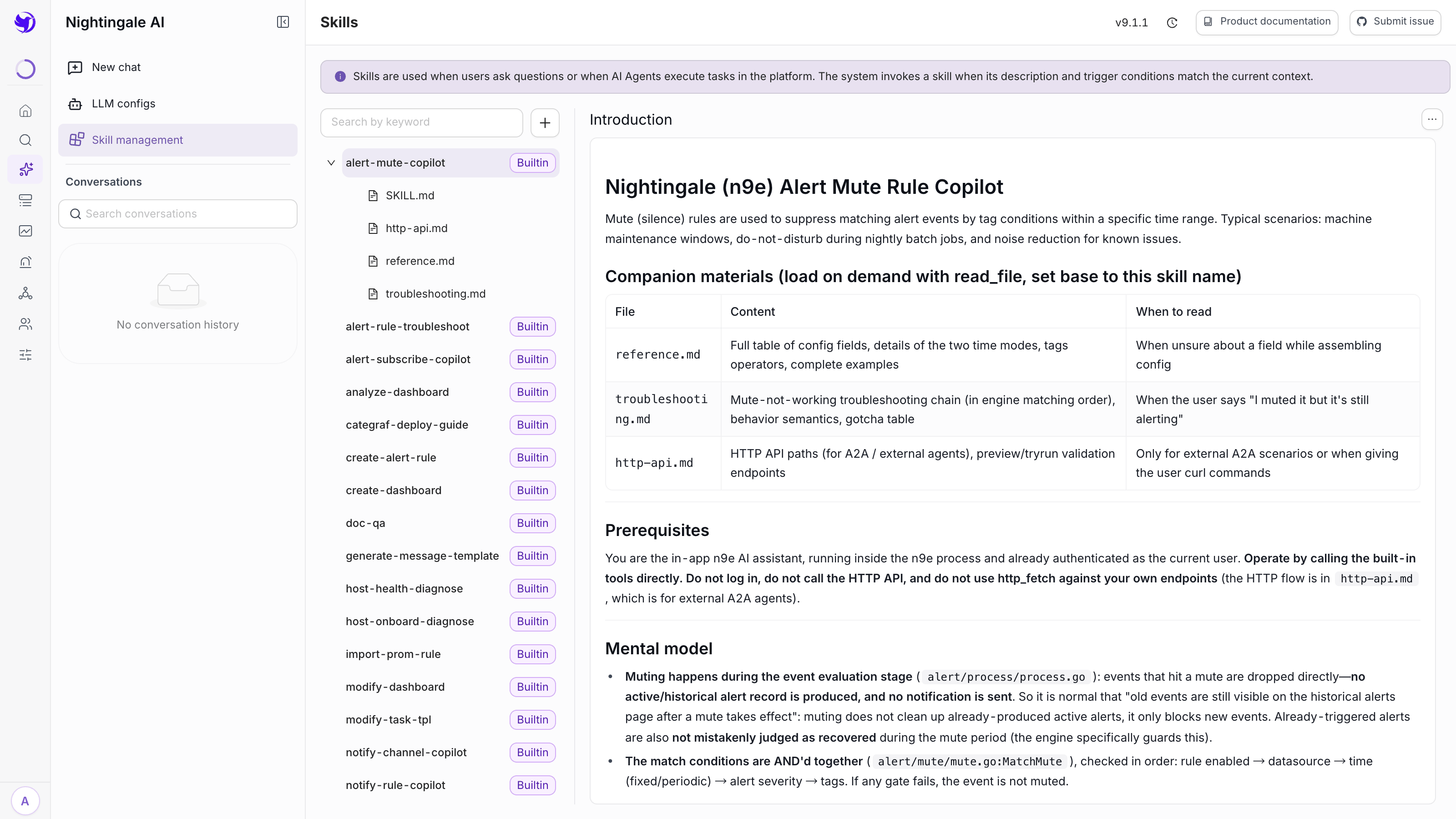
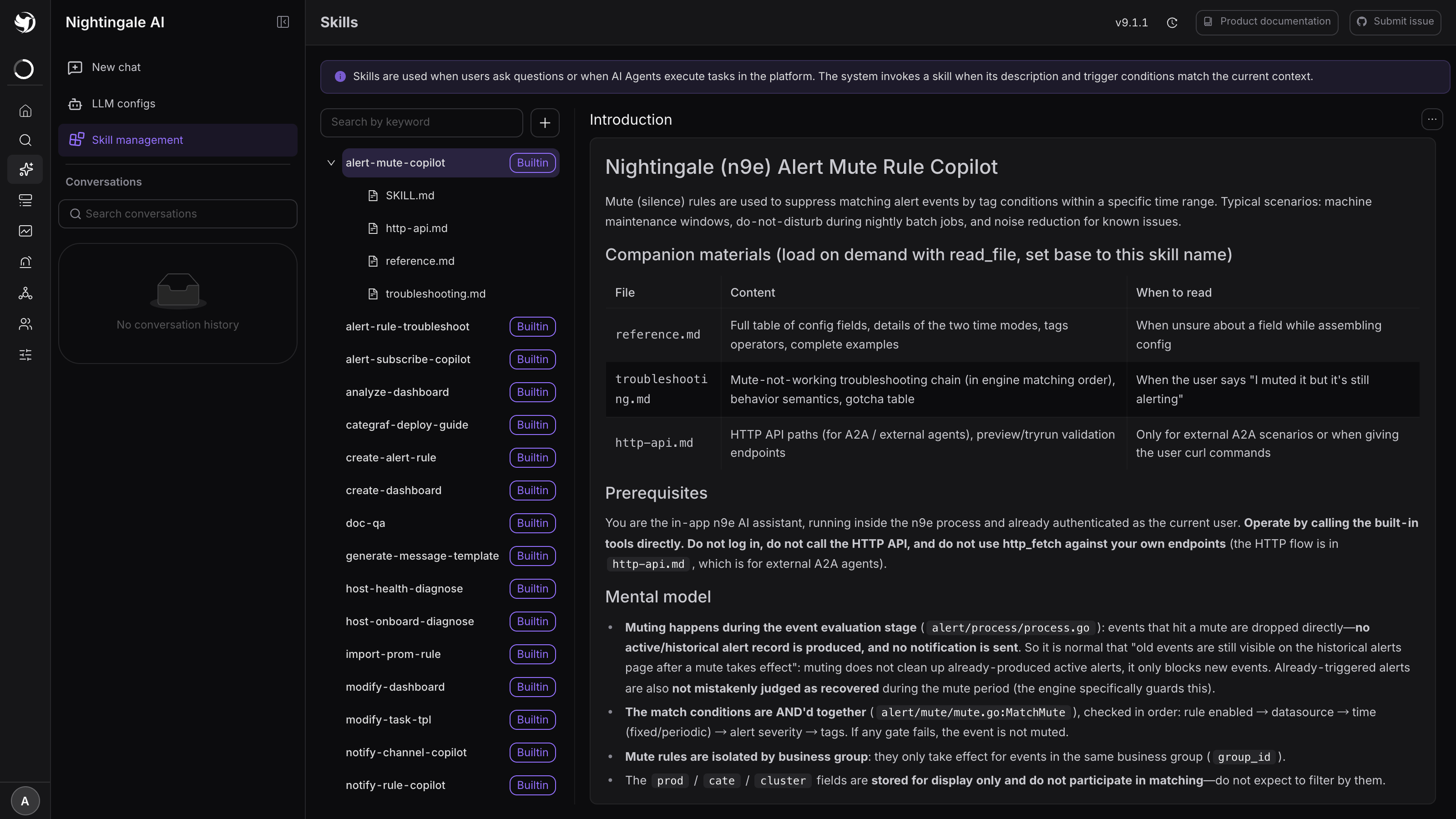
The left pane is a tree: one node per skill, expanding to its files. 22 skills ship built in
and are tagged Builtin — alert-rule troubleshooting, host health and onboarding diagnosis,
dashboard analysis and creation, PromQL and SQL generation, notification-template writing,
Prometheus rule import, self-healing script authoring, and more. You can open and read every file
in them, but they cannot be downloaded or deleted. They are also the best worked examples available
for writing your own.
The right pane shows the selected file rendered, with the enable switch and an overflow menu
(Modify / Replace, Download, Uninstall) at the top. A disabled skill is tagged OFF and is never
considered.
Three ways to add one
All three sit behind the + button next to the search box.
Write it in the browser
Write skill opens a form: name, description, instructions, and an advanced block for license, compatibility, allowed tools and metadata. Best for a pure prose procedure with no companion files.
Use a kebab-case name — mysql-replication-lag, promql-helper — because the name is also the
identifier the model sees.
Expected result: a new node in the tree, enabled, without the Builtin tag.
Upload an archive
Upload skill takes a .zip or .tar.gz up to 10 MB. SKILL.md must be at the root of the
archive (a single wrapping folder is unwrapped for you), and any other files beside it come along
— reference documents, data files, scripts.
The format is the same one Anthropic's Agent Skills use, so skills written for that ecosystem can be zipped and uploaded unchanged.
Expected result: the tree node expands to show SKILL.md plus every companion file. If the upload
is rejected with SKILL.md not found in archive root, you zipped the parent of the parent.
Install from Git
Install from Git points at an http/https repository — ssh URLs are not supported — and takes a ref type (branch, tag or commit), the ref itself, an optional subdirectory when the repo holds several skills, and optional credentials.
For a private repository choose token auth and paste a personal access token. A credential that
also needs a username (a GitLab Deploy Token, for instance) goes in as username:token. Tokens are
stored encrypted using the RSA keys under [HTTP.RSA], so those have to be configured first.
A Git-installed skill is checked against its ref, and gets an Update available tag when the remote has moved. The Update button on the detail panel re-fetches and overwrites the content — local edits are lost, which is the point: the repository is the source of truth.
What goes in SKILL.md
---
name: mysql-replication-lag
description: Diagnose MySQL replication lag alerts. Use when someone asks about
  seconds_behind_master, replication delay, standby falling behind, or a
  "MySQL slave lag" alert.
license: Apache-2.0
compatibility: needs a MySQL datasource registered in Nightingale
allowed-tools: Bash(mysql:*) Read
max_iterations: 20
builtin_tools:
  - query_prometheus
  - search_active_alerts
---

# MySQL replication lag

## 1. Confirm the lag is real
...
| Key | What it does |
|---|---|
name | Required. Empty or missing and the skill is rejected |
description | What the match is made on. Write it as the words a user would use |
license, compatibility, metadata | Shown on the detail panel; compatibility is how you state prerequisites |
allowed-tools | Space-separated pre-authorisation list, e.g. Bash(git:*) Read |
builtin_tools | Product tools to add to the model's toolbox once this skill loads |
max_iterations | Raises the tool-call budget for a long diagnostic chain. The baseline is 25 |
version: is not a supported key — several built-ins carry one and it is silently dropped, so
do not rely on it. tags, examples and recommended_tools are read when a skill arrives as an
archive or from Git, but are not stored for skills you write in the browser form.
Visibility and managing teams
Every skill has Managing teams and a Visibility of Visible to everyone or Visible to managing teams only. Managing teams is mandatory: it decides who may modify the skill, and for a private skill also who may see it at all.
A private skill is stripped from the catalogue for everyone outside those teams — the model is not told it exists, so it can neither name it nor load it.
One more place your skills never appear: the A2A agent card advertises the built-in skills only, so a third-party agent discovering Nightingale sees those and not the ones you wrote. It can still benefit from them, because a question that matches loads the skill server-side — see A2A endpoint.
Skills that run scripts
A skill may ship a main.py or main.sh beside its SKILL.md, and the model can run it. Two
things bound that, and you should know both before installing a skill you did not write.
One: the model only gets the runner when a skill asks for it. Script execution is a tool called
run_skill_script, and the model can only call it when a loaded skill lists it under
builtin_tools. Of the 22 built-ins, exactly one does.
Two: real isolation only exists on Linux, and only if you set it up. The sandbox prefers bubblewrap with a python-base root filesystem. Where it cannot build that — any non-Linux host, and any Linux host where you have not supplied a root filesystem — it falls back to running the script directly on the Nightingale host, and says so at startup:
sandbox: SKILL EXECUTION RUNNING WITHOUT ISOLATION (unsafe-exec) — install bubblewrap
+ a python-base rootfs for real isolation, or set Sandbox.RequireIsolation=true to
refuse. reason: ... (tier=..., os=..., kernel=...)
Grep your startup log for that line. If it is there, treat every installed skill as code you are
running as the Nightingale process user. The safe posture for a server that installs third-party
skills is to refuse rather than degrade. The section does not exist in etc/config.toml, so add
it:
[Center.Sandbox]
RequireIsolation = true

# On Linux, point this at a python-base root filesystem and you get real
# isolation instead of a refusal:
[Center.Sandbox.Rootfs]
Path = "/opt/n9e/sandbox/python-base"
Restart center. From then on a skill script is refused rather than run unprotected. When isolation
is in force the script gets read-only mounts of the skill and its input, a writable scratch
directory, a clean environment, and — by default — 30 seconds, 256 MB and one CPU. Under
unsafe-exec the script also gets no network, because the egress proxy cannot be enforced
without a sandbox.
Every run is logged: sandbox audit: exec_id=... engine=... network=... exit_code=..., and the
answer in the conversation states the isolation level it ran at.
Make it actually get picked
The single most common complaint — "I wrote a skill, enabled it, and the assistant ignores it" — is almost always the description.
- Write the description in the user's words, not yours. List the phrasings someone would actually type, including the alert names and error strings they would paste in.
- Say when not to use it. The built-ins do this:
alert-rule-troubleshootexplicitly points atops-troubleshootingfor the other kind of question. - Keep one topic per skill. Several near-identical descriptions all match, all get loaded, and all eat context.
- Test it in a chat, then adjust: change the description if it was not picked, change the instructions if it was picked and behaved wrongly.
Next
- Where the model comes from: Configure an LLM provider
- What the assistant does with skills: Nightingale AI overview
- Guardrails around anything that changes state: Safe automation patterns