kube-state-metrics vs metrics-server vs cAdvisor vs node_exporter
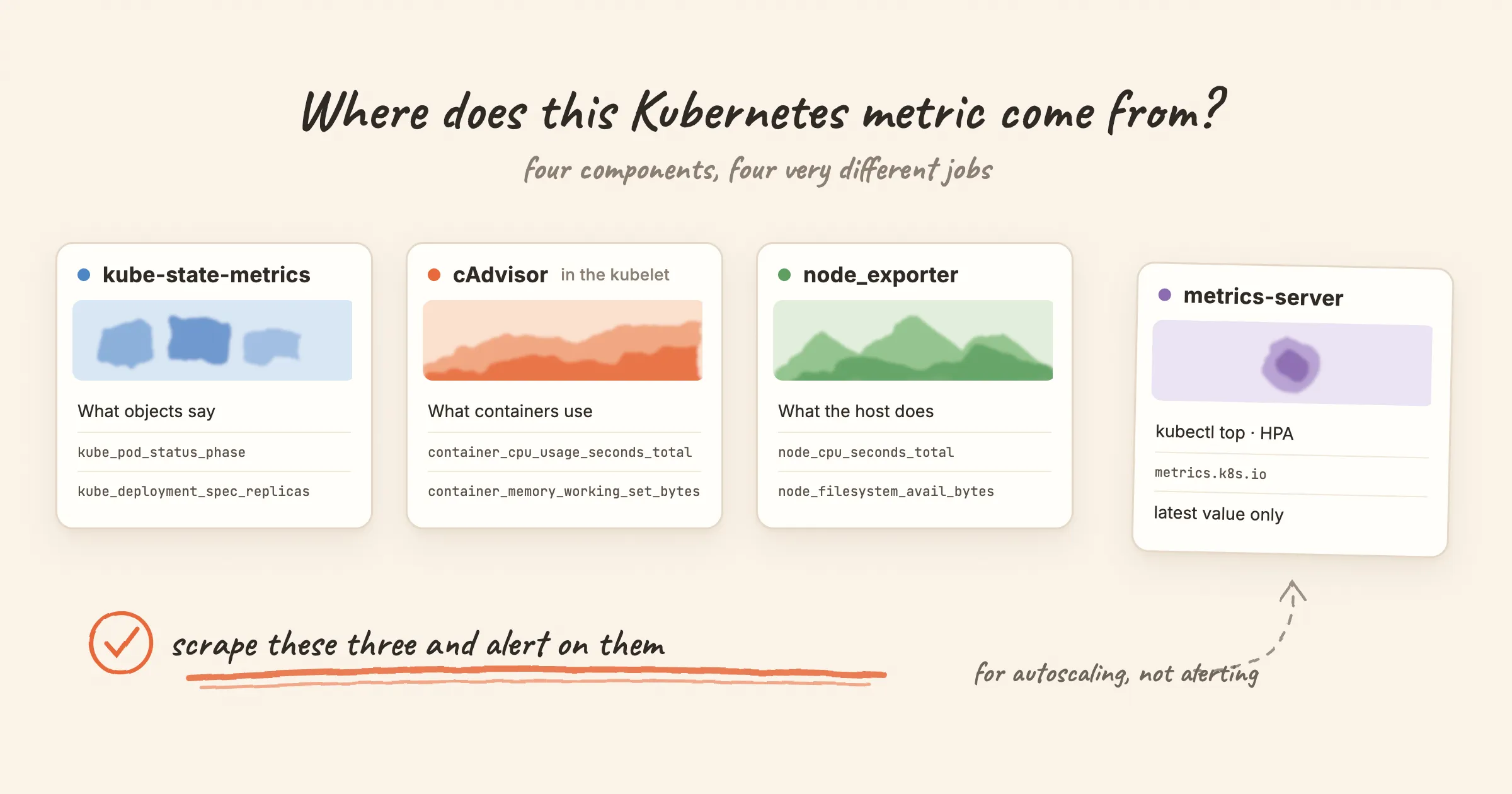
Kubernetes metrics come from four places, and their names look alike. kube_pod_container_resource_limits, container_memory_working_set_bytes, node_memory_MemAvailable_bytes and the numbers in kubectl top all sound like they describe the same thing. They are made by different components and they answer different questions. Only three of the four are meant for monitoring.
This post explains what each component measures and how to tell which one a metric came from. It also covers the renames that make a query copied from a 2019 blog post return nothing.
The short answer
| Component | Measures | Where it gets the data | Metric prefix | Use it for |
|---|---|---|---|---|
| kube-state-metrics | The state of Kubernetes objects: desired vs actual replicas, pod phase, container restarts, resource requests and limits | Watches the API server | kube_ | Alerting and dashboards |
| cAdvisor | What each container actually uses: CPU, memory, throttling, filesystem, network | Built into the kubelet, served at /metrics/cadvisor | container_ | Alerting and dashboards |
| node_exporter | The machine underneath: CPU modes, memory, disks, filesystems, network interfaces | A DaemonSet reading /proc and /sys on each node | node_ | Alerting and dashboards |
| metrics-server | A CPU and memory snapshot for each pod and node | Scrapes the kubelet's /metrics/resource | none; it serves the Metrics API (metrics.k8s.io) | kubectl top, the Horizontal and Vertical Pod Autoscalers |
You will also meet two more sources. The kubelet's own /metrics endpoint provides things like kubelet_volume_stats_available_bytes, which tells you how full a PersistentVolume is. The API server exposes apiserver_* metrics about itself. Neither belongs to the four above, and alert rules use both.
kube-state-metrics: what the API server believes
kube-state-metrics listens to the API server and turns objects into metrics. Its README calls this "the health of the various objects inside" the cluster, as opposed to the health of the cluster components themselves. It exposes the values as the API returns them. It does not apply the heuristics kubectl uses, which is why its numbers sometimes differ from what kubectl get prints.
That makes it the right source for questions about intent:
- Does the Deployment have the replicas it asked for?
kube_deployment_spec_replicasvskube_deployment_status_replicas_available. - Is a container stuck in
CrashLoopBackOff?kube_pod_container_status_waiting_reason. - Why did the last run end?
kube_pod_container_status_last_terminated_reason, wherereason="OOMKilled"is the one you usually want. - Is a node
NotReady?kube_node_status_condition.
It tells you nothing about usage. A pod at 100% of its CPU limit and an idle pod look the same to kube-state-metrics. For usage you need cAdvisor.
The rename that breaks old queries. kube-state-metrics 2.0 removed the per-resource metrics such as kube_pod_container_resource_limits_cpu_cores and kube_pod_container_resource_requests_memory_bytes. Their replacements are kube_pod_container_resource_limits and kube_pod_container_resource_requests, with resource and unit labels:
# kube-state-metrics 1.x (removed in 2.0)
kube_pod_container_resource_limits_cpu_cores

# kube-state-metrics 2.x
kube_pod_container_resource_limits{resource="cpu", unit="core"}
A query that uses the old name does not fail. It returns an empty result, and an alert rule built on it never fires. We found exactly this in our own Kubernetes template while writing this post: the container CPU rule still used the 1.x metric name and the old pod_name label. It now uses the current names.
cAdvisor: what containers actually use
cAdvisor is compiled into the kubelet, so there is nothing extra to deploy. Prometheus scrapes it from each node at /metrics/cadvisor. These are the metrics you reach for when a pod is slow or keeps getting killed:
container_cpu_usage_seconds_total: CPU time consumed. Take arate()to get cores in use.container_memory_working_set_bytes: memory the kernel cannot easily reclaim. The kubelet uses the working set for eviction decisions, andkubectl topshows the same number.container_cpu_cfs_throttled_periods_totalandcontainer_cpu_cfs_periods_total: how often the container hit its CPU limit and was paused. The CPUThrottlingHigh rule is the ratio of the two.
Two things trip people up:
- Extra series. cAdvisor also reports cgroups that are not your application container: a pod-level series with
container=""and, on older Docker-based nodes, the pause container ascontainer="POD". Summing without a filter counts the same memory twice. Addcontainer!=""(andcontainer!="POD"on old nodes) when you aggregate. - Label names changed. Before Kubernetes 1.16, cAdvisor labelled series
pod_nameandcontainer_name. They are nowpodandcontainer. A rule that groupsby (pod_name)returns nothing on a current cluster.
Usage becomes useful when you compare it with a limit, and the limit lives in kube-state-metrics. Both sides share the namespace, pod and container labels, so the join is direct:
sum by (namespace, pod, container) (container_memory_working_set_bytes{container!=""})
/
sum by (namespace, pod, container) (kube_pod_container_resource_limits{resource="memory"})
> 0.9
node_exporter: the machine underneath
node_exporter runs as a DaemonSet with access to the host's /proc and /sys. It knows nothing about pods. It reports the operating system: node_cpu_seconds_total by mode, node_memory_MemAvailable_bytes, node_filesystem_avail_bytes, disk I/O and network errors.
Use it for the questions Kubernetes does not answer. Is the node's root filesystem filling up? Is the clock drifting? Is a NIC dropping packets? Is the kernel OOM killer firing (node_vmstat_oom_kill)? Node-level memory includes page cache and every process on the host, so it will not add up to the sum of your containers. That is expected.
The Linux rule set covers the common host checks, including disk-fill prediction with predict_linear.
metrics-server: for autoscaling, not alerting
metrics-server collects CPU and memory every 15 seconds from each kubelet's /metrics/resource endpoint and serves them through the Metrics API. The Horizontal Pod Autoscaler reads it, the Vertical Pod Autoscaler reads it, and kubectl top reads it.
It keeps only the latest value, in memory. There is no history to query and no Prometheus endpoint to scrape. The project's README says it plainly: metrics-server is meant for autoscaling, and you should not use it to forward metrics to monitoring solutions. If you want those numbers in your monitoring system, scrape the kubelet's /metrics/resource endpoint directly.
So when kubectl top and your dashboard disagree by a few percent, neither is wrong. They read different endpoints at different moments.
Which component answers your question
| Question | Metric | Source |
|---|---|---|
| Is the pod restarting? | kube_pod_container_status_restarts_total | kube-state-metrics |
| Was it OOM-killed? | kube_pod_container_status_last_terminated_reason{reason="OOMKilled"} | kube-state-metrics |
| Is a container close to its memory limit? | container_memory_working_set_bytes ÷ kube_pod_container_resource_limits{resource="memory"} | cAdvisor + kube-state-metrics |
| Is it being CPU-throttled? | container_cpu_cfs_throttled_periods_total ÷ container_cpu_cfs_periods_total | cAdvisor |
| Does the Deployment have the replicas it wants? | kube_deployment_status_replicas_available vs kube_deployment_spec_replicas | kube-state-metrics |
Is a node NotReady? | kube_node_status_condition{condition="Ready"} | kube-state-metrics |
| Is a node's disk filling up? | node_filesystem_avail_bytes | node_exporter |
| Is a PersistentVolume filling up? | kubelet_volume_stats_available_bytes | kubelet |
| How much CPU is the pod using right now? | kubectl top pod | metrics-server |
Ready-made rules, sorted by source
Most of the standard Kubernetes alerts read kube-state-metrics. Each of these pages explains what the alert means, its common causes and the steps to fix it, and lists the metrics it uses:
- kube-state-metrics: KubePodCrashLooping, KubePodNotReady, KubeDeploymentReplicasMismatch, KubeNodeNotReady, KubeJobFailed, KubeHpaMaxedOut
- kubelet: KubePersistentVolumeFillingUp
- cAdvisor: CPUThrottlingHigh
- API server: KubeAPIErrorBudgetBurn, KubeClientCertificateExpiration
The full Kubernetes rule set is available as a Prometheus rules file you can download and load with rule_files.
With Nightingale
Nightingale does not replace any of these four components. It queries the store where their metrics already land, such as Prometheus or VictoriaMetrics, and runs alert rules against it. The Kubernetes integration ships the rules above, each with its runbook attached, and you can import them into a business group in one step.