Templates and variables
Templates are Go text/template with every variable under $event; a misspelled variable raises no error and just leaves a hole in the message — preview catches it.
Last reviewed
Where this page ends: your own message template, every variable in it verified in the preview, and an understanding of why a misspelled variable never raises an error — it just leaves a hole in the message.
Open the template editor
Alerts & Notifications → Message templates. The list is on the left, the editor in the middle, and a panel of referenceable event variables on the right (click any of them to copy).
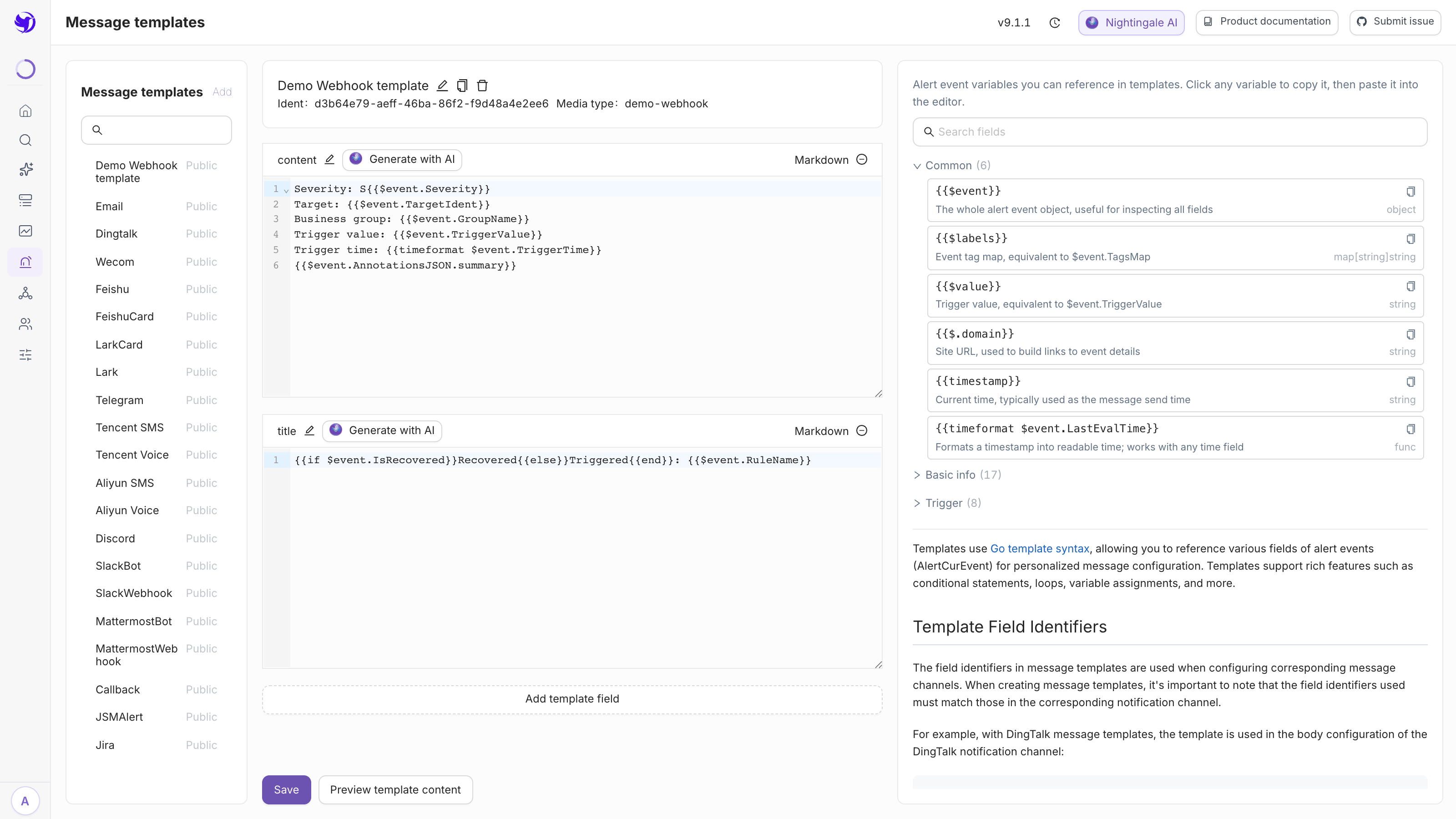
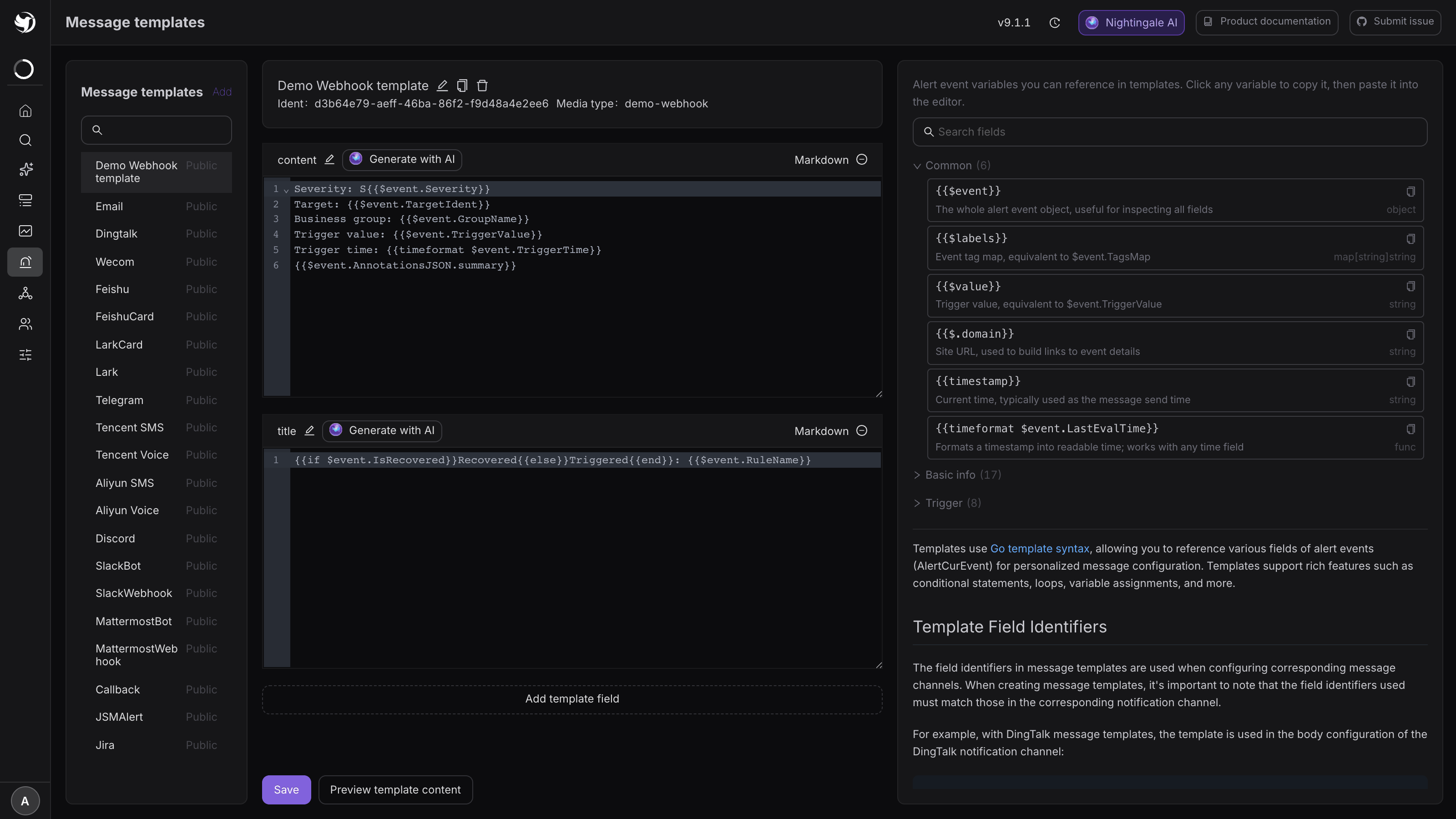
The header shows the template's ident and its media type. The ident is a server-side uuid you never need to touch; the media type decides which media type this template appears under in a notification rule.
The open-source edition ships 20 templates, covering dingtalk, wecom, feishu,
feishucard, lark, larkcard, telegram, discord, slackbot, slackwebhook,
mattermostbot, mattermostwebhook, email, callback, jira, jsm_alert, tx-sms,
tx-voice, ali-sms and ali-voice. Do not edit a built-in template in place — an
upgrade overwrites any template whose update_by is still system. Clone it first.
Every variable hangs off $event
A template is a Go template. Before rendering, the backend injects these:
{{ $events := .events }}          {{/* the batch, an array */}}
{{ $event := index $events 0 }}   {{/* the first event — what you almost always want */}}
{{ $labels := $event.TagsMap }}   {{/* label key/value pairs */}}
{{ $value := $event.TriggerValue }}
So a field is written {{$event.RuleName}}, not {{.RuleName}}. The latter raises no
error; it renders as an empty string. "The message went out but one line is blank" is nearly
always this.
The site URL is the exception: it is a key in the render data rather than a variable, written
{{$.domain}}. Do not write {{.domain}} — dot is rewritten inside range and with, so
that form only holds at the top level.
The variables and helpers you will actually use
The right-hand panel groups fields into Common / Basic / Trigger / Tags and annotations / Target / Notification / Callback and extras, and is searchable. The ones that come up most:
| Expression | What it is |
|---|---|
{{$event.RuleName}} | Rule name |
{{$event.RuleNote}} | Rule note |
{{$event.Severity}} | Severity, 1 / 2 / 3 |
{{$event.IsRecovered}} | Whether this is a recovery event |
{{$event.TriggerValue}} | The value at trigger time |
{{$event.TagsJSON}} | Labels as an array |
{{$event.TagsMap.instance}} | One specific label — replace instance with your own key |
{{$event.AnnotationsJSON.summary}} | One specific annotation |
{{$event.TargetIdent}} / {{$event.GroupName}} | Host ident / business group |
{{$event.TriggerTime}} / {{$event.FirstTriggerTime}} / {{$event.LastEvalTime}} | Three timestamps, all int64 |
Timestamps need formatting to be readable: {{timeformat $event.TriggerTime}}.
timeformat only accepts int64 — hand it a string and it renders
invalid value; expected int64 and sends that verbatim. For the current time use
{{timestamp}}.
Other helpers worth knowing: humanizeDurationInterface (seconds → "1h20m"), formatDecimal
(round to N places), sub / add / now.Unix (durations), jsonMarshal, toUpper /
toLower, join. The full field list lives in
Notification template variables.
The idiomatic way to show "how long has this been firing", copied from the built-in DingTalk template:
{{$d := sub now.Unix $event.FirstTriggerTime}}
{{if $event.IsRecovered}}{{$d = sub $event.LastEvalTime $event.FirstTriggerTime}}{{end}}
Duration: {{humanizeDurationInterface $d}}
The media type decides the field names
A template can hold several fields (Add template field, below the editor). The names are not free-form — the media type's request body hard-codes which ones it reads:
| Media type | How the body references it | Fields the template must have |
|---|---|---|
| DingTalk | {{$tpl.title}} + {{$tpl.content}} | title, content |
| WeCom | {{$tpl.content}} | content |
| Feishu Card | {{$tpl.title}} + {{$tpl.content}} | title, content |
| fixed | subject, content | |
| Aliyun SMS / Voice | {{$tpl.incident}} | incident |
A field that does not match renders empty and the backend does not complain. When you create a template the UI derives the expected field names from the media type's request body and seeds usable starter content, so "create" is safer than "start from a blank editor".
Create your own template
Click Add above the list (or select a built-in template and click the clone icon):
| Field | Notes |
|---|---|
| Name | Yours, e.g. Dingtalk-ops |
| Authorized teams | Required; decides who may edit this template |
| Media type | The dropdown lists only the types of media types that already exist |
| Visibility | Public / Private |
Save, edit the content in the editor, save again. Then go back to the notification rule and point that notification config's Message template at the new one.
Most built-in templates are written in Chinese; the Discord / Slack / Mattermost / Jira ones are in English. Clone and translate if you need another language.
Preview
Preview below the editor renders the template against real data:
- Mock event — a built-in fake event whose severity and recovered flag you can choose; use this on a fresh install.
- History events — pick real events that already happened.
Expected result: one rendered block per field. When a field fails to render, the preview shows the Go template error directly — this is the only place a template error is visible. During a real send the error text is delivered as the message body instead.
Email templates are the exception
Email renders through text/template with no escaping at all, so HTML tags survive verbatim,
and the mail body is sent as text/html — which is why the built-in Email template is one
large HTML table. The flip side: a newline in a plain-text template is not a line break in the
recipient's mail client, so write <br>.
Every other media type goes through html/template, and the result is then JSON-escaped
(quotes and newlines) because it has to sit inside a JSON string in the request body. That
means hand-written <b> tags in a non-email template get escaped away, unless the target
platform expects HTML anyway (the built-in Telegram template relies on parse_mode: HTML).
Traps worth knowing about
- A misspelled variable is silent.
{{$event.RuleNam}}renders empty. Preview before you ship. {{.RuleName}}is always empty. The top-level dot only has the keyseventsanddomain.- Give an edit a moment. The alerting engine caches templates; a save takes effect within roughly 10 seconds.
- Never edit built-ins. As long as
update_byissystem, an upgrade restores them. Clone first. - The create API takes an array. When creating via the API the body must be
[{...}]. The server generates the uuid ident itself and ignores the one you send; on update you must echo back the stored ident or you getcannot update ident.
Next
- The full field list: Notification template variables
- How field names join to media types: Notification architecture
- Debugging a render error: Template rendering errors
- Run it through the real path afterwards: Test a notification end to end