Slack / Telegram / Discord / Mattermost
Webhook-based chat channels, and how to format a message that survives each one's markdown.
Last reviewed
Where this page ends: a media type that posts to Slack, Telegram, Discord or Mattermost, and an understanding of why the same template renders differently in each of them.
The four are not equal
The backend registers send logic for all four, and all four have built-in message templates
among the 20 shipped (telegram, slackwebhook, slackbot, discord, mattermostwebhook,
mattermostbot). The difference is only the type panel on the media types page:
| Platform | Card in the type panel | Built-in template | How to create the media type |
|---|---|---|---|
| Telegram | Yes | Telegram | Click the card, fill in token and chat id |
| Slack | No | SlackWebhook / SlackBot | Import, or use a Callback media type |
| Discord | No | Discord | Same |
| Mattermost | No | MattermostWebhook / MattermostBot | Same |
So the last three are not unsupported, they just have no ready-made form. Once the media type
exists, getting its media type string (ident) right is enough for the built-in template to
appear in the notification rule — that string is the only thing joining a template to a media
type.
Telegram: there is a card for it
Alerts & Notifications → Media types, then Telegram on the left.
Prepare two things in Telegram first:
- Bot token — talk to @BotFather,
/newbot→ a display name → a username ending inbot. You get a token like123456789:AAE.... - Chat id — add the bot to the target room, post a message, then open
https://api.telegram.org/bot<TOKEN>/getUpdatesand readchat.id. Direct chats are positive, groups and channels are negative (-100…) — keep the minus sign.
Besides the name, there is usually only one thing to change in the form: HTTP configuration →
Proxy. Fill in an HTTP proxy that can reach api.telegram.org if your servers cannot.
URL, query parameters and body are pre-filled: the body is
{"text":"{{$tpl.content}}","parse_mode":"HTML"}, and the built-in Telegram template is
written with HTML tags to match. If you rewrite the template in Markdown, change parse_mode
to MarkdownV2 as well — otherwise Telegram either shows the tags verbatim or answers
Can't parse entities.
Slack, Discord and Mattermost: create the media type by import
The media types list has an Import button at the top right that takes a block of JSON. It
is the only way to set ident — in the form that field is hidden and comes from the card
you clicked.
For a Slack incoming webhook, paste this:
[
  {
    "name": "Slack",
    "ident": "slackwebhook",
    "enable": true,
    "request_type": "http",
    "param_config": {
      "custom": {
        "params": [
          { "key": "webhook_url", "cname": "Webhook Url", "type": "string" }
        ]
      }
    },
    "request_config": {
      "http_request_config": {
        "url": "{{$params.webhook_url}}",
        "method": "POST",
        "headers": { "Content-Type": "application/json" },
        "timeout": 10000,
        "concurrency": 5,
        "retry_times": 3,
        "retry_interval": 100,
        "request": {
          "body": "{\"text\": \"{{$tpl.content}}\", \"mrkdwn\": true}"
        }
      }
    }
  }
]
Expected result: a new row whose media type is slackwebhook. Select it in a notification rule
and the built-in SlackWebhook template appears in the message template dropdown.
For the other three, swap ident, param_config and body:
| Media type | URL | Body | Parameters |
|---|---|---|---|
slackwebhook | {{$params.webhook_url}} | {"text": "…", "mrkdwn": true} | webhook_url |
slackbot | https://slack.com/api/chat.postMessage | {"channel": "#{{$params.channel}}", "text": "…", "mrkdwn": true} | channel; token goes in the Authorization: Bearer <token> header |
discord | {{$params.webhook_url}} | {"content": "…"} | webhook_url |
mattermostwebhook | {{$params.webhook_url}} | {"text": "…"} | webhook_url |
mattermostbot | <your Mattermost URL>/api/v4/posts | {"channel_id": "{{$params.channel_id}}", "message": "…"} | channel_id; token in the header |
Every … above is {{$tpl.content}}. The body is a JSON string, so the quotes inside it
must be escaped. Do not hard-code the webhook URL in the media type — leave
{{$params.webhook_url}} and let each notification rule supply its own, so one media type
serves many channels.
For the bot variants (slackbot, mattermostbot) the token lives in a header, and a header
value may be written {{.your_variable}} to pull the secret from
Variables instead of storing it in the clear.
The other route: a Callback media type with a hand-written body
If you would rather not touch JSON, use the built-in Callback media type: click Callback in
the type panel, leave the URL as {{$params.callback_url}}, and rewrite the body into whatever
shape the target expects.
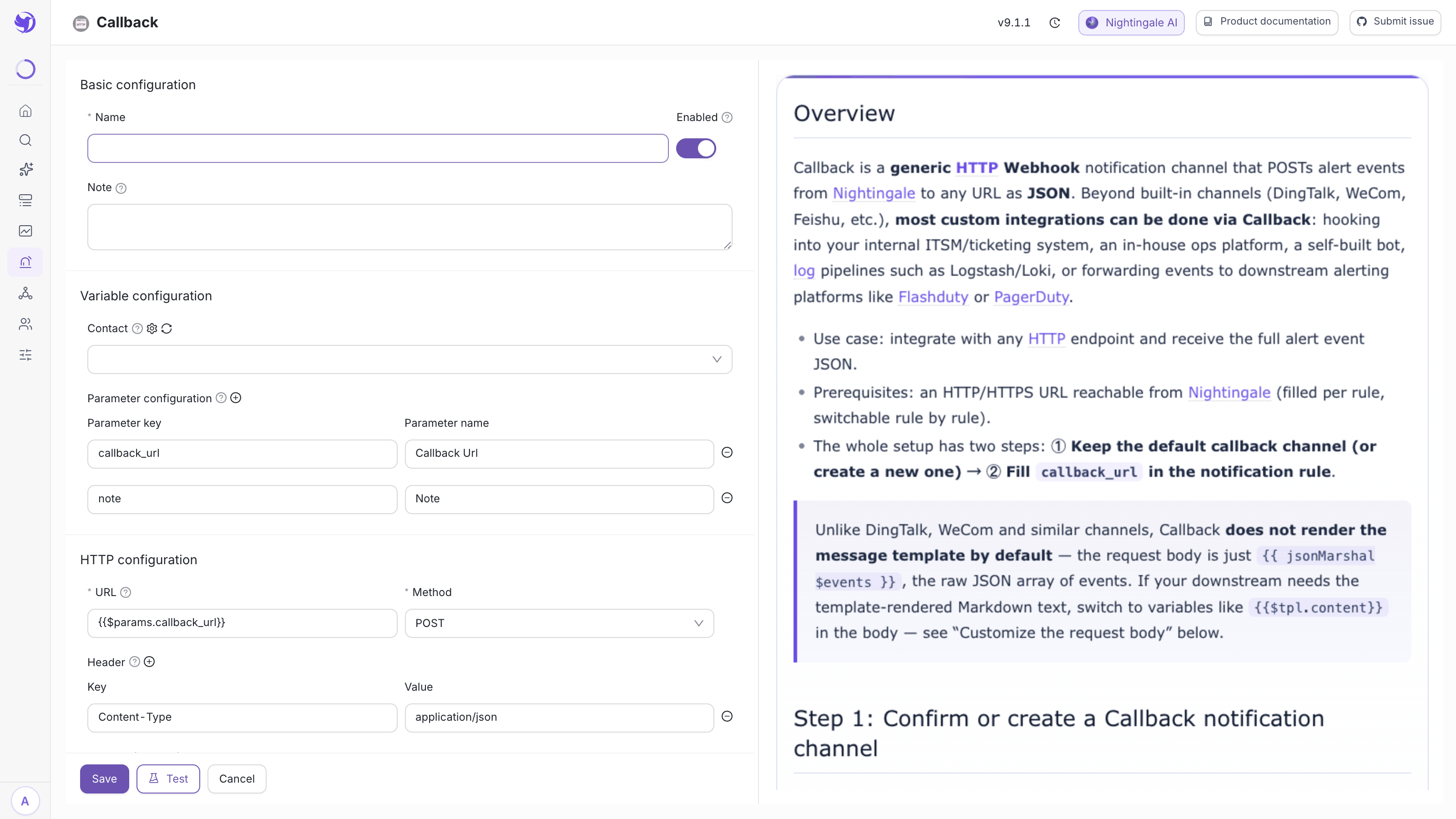
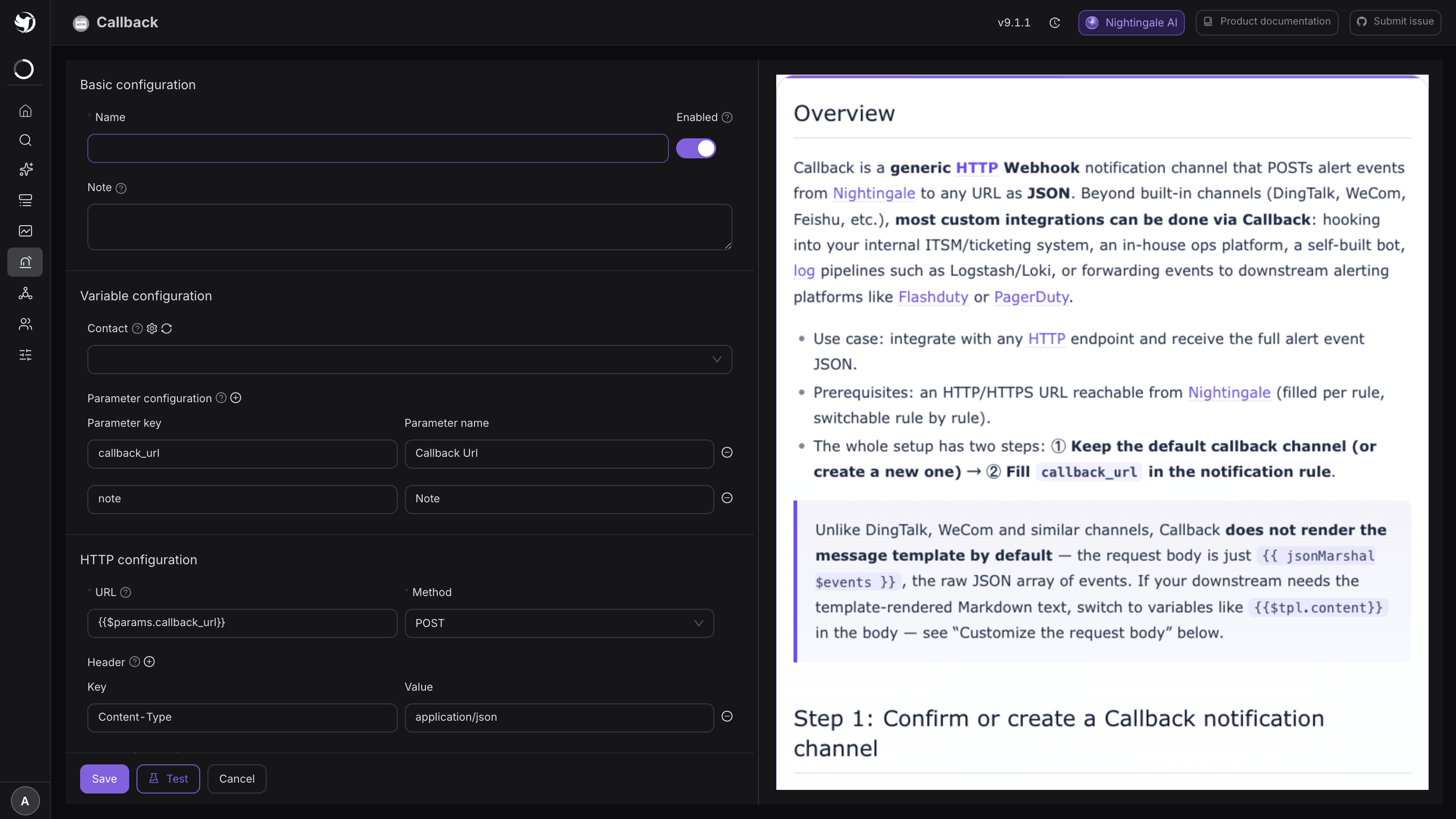
The cost: Callback media types do not consume message templates, and the UI hides the template dropdown for them. The whole message layout has to live in the media type's body, assembled from event variables directly:
{"text": "[S{{$event.Severity}}] {{$event.RuleName}} - {{$event.TargetIdent}}"}
That is the shortest path when one platform needs exactly one message format. If you want different wording per team, use the import route above and let templates carry the layout.
Each platform's markup is different
The same text renders differently in each of the four, which is why the built-in templates are written separately:
| Platform | Bold | Link | Notes |
|---|---|---|---|
| Slack | *bold* (single asterisk) | <url|text> | The body needs "mrkdwn": true |
| Discord | **bold** | [text](url) | Standard Markdown |
| Mattermost | **bold** | [text](url) | Standard Markdown |
| Telegram | <b>bold</b> | <a href="url">text</a> | Relies on parse_mode: HTML in the body |
If you want one template that reads correctly everywhere, stick to plain text and newlines and skip bold and link syntax entirely.
Two Slack-specific quirks
Rendering treats the slackwebhook and slackbot media types specially:
<is restored. Every other media type goes throughhtml/template, which escapes<to<. That would break Slack's<url|text>link syntax, so after rendering<is turned back into<.- A failed render drops the whole field. Other media types send the Go template error as the message body — ugly, but at least visible. Slack simply omits the field, so the message can come out empty. Always check a Slack template with Preview; see Templates and variables.
Wire it into a notification rule
From here it behaves like any other media type: create a notification rule → pick the media
type → pick the template → fill in webhook_url and friends → check the applicable severities
→ Run test.
Expected result: a correctly formatted message in the channel.
One trap worth knowing in advance: Nightingale counts only HTTP 200 as success and records every other status as a failure. A Discord webhook does not answer 200 on success, so "the message arrived but the notification record says failed" is expected there. Trust whether the message is in the channel, not the status in the record.
Common errors
| Error | Cause |
|---|---|
status_code:400, response:invalid_payload (Slack) | The body is not valid JSON, usually unescaped quotes from the template |
status_code:404, response:no_service (Slack) | The webhook URL was revoked or is wrong |
status_code:401 Unauthorized (Telegram) | Wrong token, or BotFather reset it |
400 chat not found (Telegram) | Wrong chat id, a missing minus sign, or the bot has never seen that chat |
all retries failed (Telegram) | No egress; configure a proxy |
invalid value; expected int64 in the message | The template passed a non-timestamp field to timeformat |
Next
- Template variables and helpers: Templates and variables
- How media types, templates and rules relate: Notification architecture
- On-call platforms and tickets: PagerDuty / FlashDuty / Jira