ClickHouse / Doris / IoTDB
ClickHouse, Doris and IoTDB are one family in Nightingale: queried with SQL, one numeric column of the result becomes the series value and the rest become labels.
Last reviewed
These three hold different things — ClickHouse and Doris usually hold bulk logs and event detail, IoTDB holds device time series — but to Nightingale they are one family: you query them with SQL, and the table that comes back is treated as series for a rule to judge. This page covers how to connect each one, what shape the SQL has to take, and which column becomes a value and which becomes a label.
What each one can do in the open-source edition
Their capabilities differ, so check this before you connect anything and then find you cannot pick it in the explorer:
| Register a source | Alert rules | Metrics explorer | Dashboards | |
|---|---|---|---|---|
| ClickHouse | ✓ | ✓ | — | — |
| Doris | ✓ | ✓ | — | — |
| IoTDB | ✓ | ✓ | ✓ | ✓ |
In other words, in the open-source edition ClickHouse and Doris are only useful for alert rules. They do not appear in the explorer data source picker and cannot be selected in dashboard panels. IoTDB has no such limit.
All three work in alert rules, but only once at least one data source of that type exists — the Data source type picker in the rule form lists only the types you have actually registered, so with no Doris source registered the Doris card simply is not there.
ClickHouse
Integrations → Data sources → Add → ClickHouse.
| Field | What to put in it |
|---|---|
| Name | Required |
| Protocol | Native or HTTP, Native by default |
| Nodes | host:port, and no http:// prefix — one is rejected outright. Native listens on 9000 by default, HTTP on 8123 (the form's placeholder says 9200, which is a typo; don't copy it) |
| Secure connection (SSL/TLS) | Turning it on reveals a Skip SSL verify switch |
| User / Password | As needed |
Nodes is a list you can extend, but the current implementation uses only the first entry — extra nodes are not yet part of any rotation.
Advanced settings holds the pool and the caps: timeout in milliseconds (default 100000), maximum rows retrieved per request (default 500, required), max idle connections (10), max open connections (100), max connection lifetime in seconds (14400).
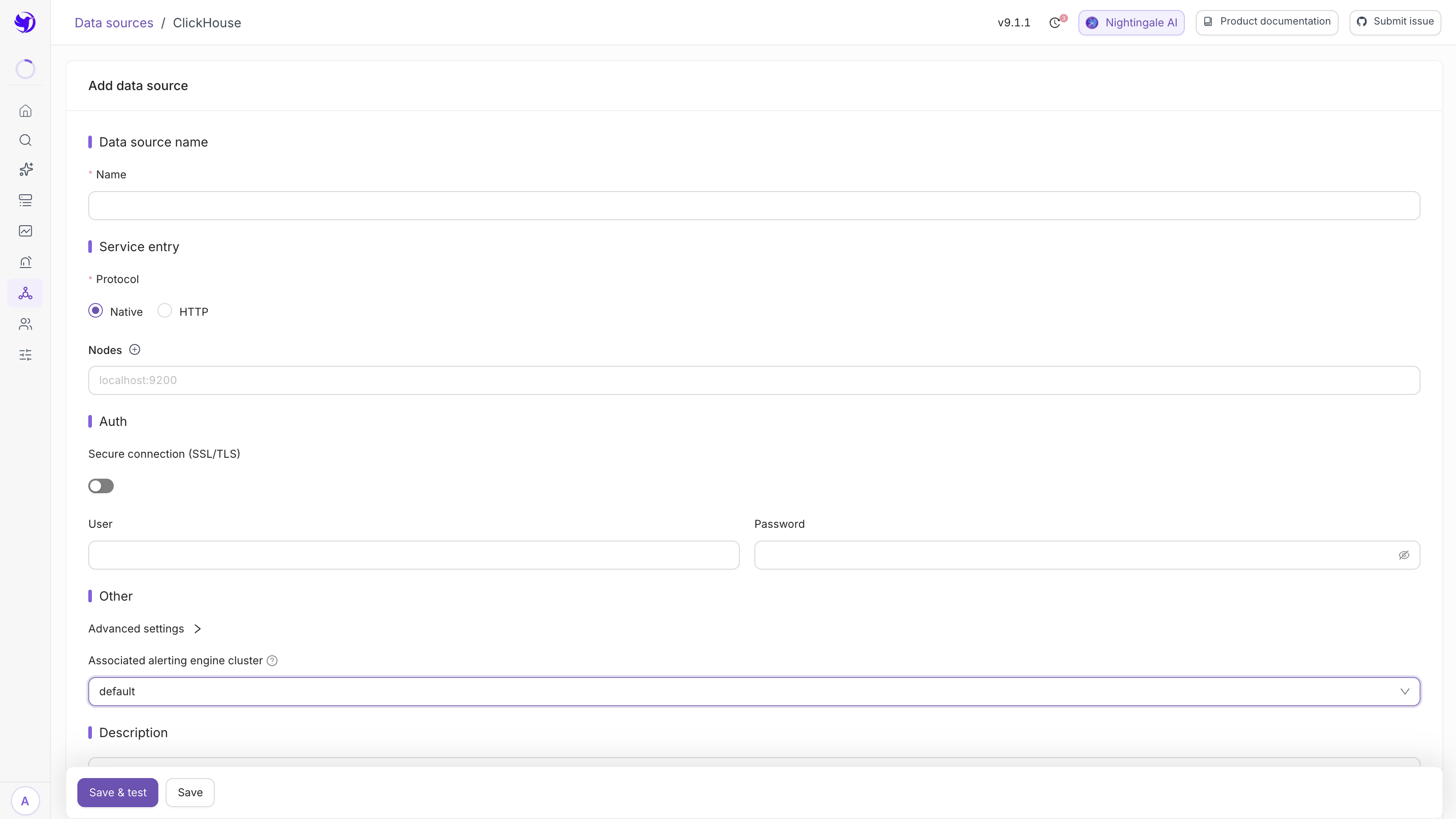
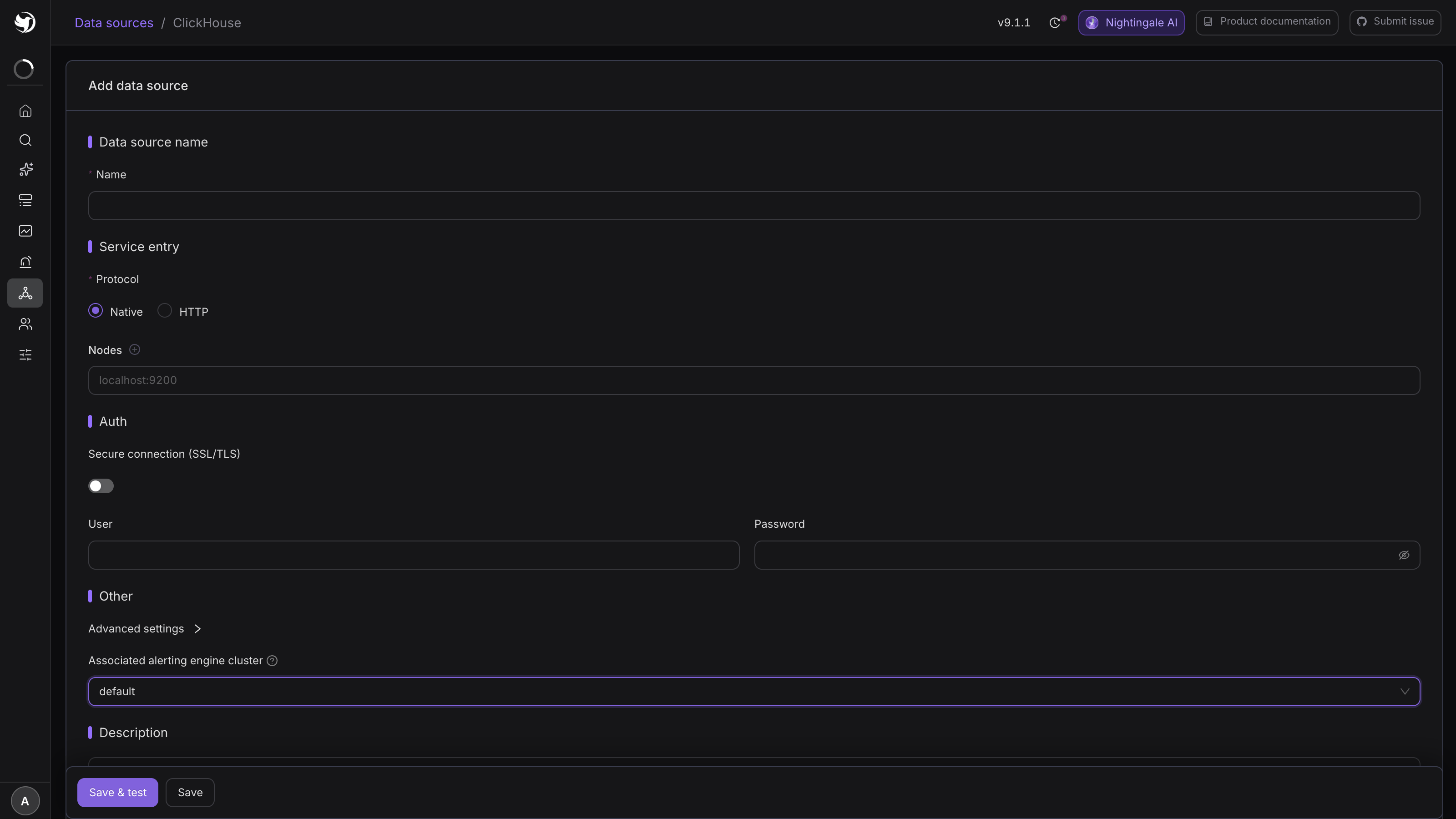
Save & test genuinely opens a connection and runs SHOW DATABASES; failing that, nothing is
stored. A malformed address (one carrying http://) counts as a config error rather than a
connectivity problem, so even plain Save will not store it.
Doris
Integrations → Data sources → Add → Doris.
| Field | What to put in it |
|---|---|
| Name | Required |
| URL | The FE MySQL-protocol address in the form localhost:9030, with no scheme |
| User / Password | As needed |
| Timeout (unit: milliseconds) | Defaults to 100000 |
| Maximum number of rows allowed to be retrieved in a single request | Defaults to 500 |
| Max idle / open connections, max connection lifetime | Same as ClickHouse |
The Doris query editor has Database and Table dropdowns; once they are set, Quick query generates SQL from a template, and Custom query lets you write it yourself.
It also has a time macro: $__timeFilter(`timestamp`). Only a SQL statement that uses it
responds to the time range picked on the page. Without it the editor warns — "The query condition
does not contain a time macro, and the selected time range will not take effect" — which is
another way of saying the statement may be scanning the whole table.
IoTDB
Integrations → Data sources → Add → IoTDB.
| Field | What to put in it |
|---|---|
| Name | Required |
| URL | The REST endpoint; the form pre-fills http://localhost:18080 |
| Timeout(ms) | Defaults to 10000 |
| User / Password | As needed |
The connectivity test posts show databases to <URL>/rest/table/v1/query.
The IoTDB query editor adds two things: SQL templates (ready-made statements where you replace
the $variable placeholders with real values), and a time field / time format pair — IoTDB's
time column is not always named the same, so you tell Nightingale explicitly which column is the
time axis and how to parse it.
How a result set becomes series
This is the biggest difference between SQL sources and PromQL sources, and where people get stuck.
PromQL already returns time series; SQL returns a table. Nightingale translates the table with two auxiliary settings:
- Value field — which columns hold numbers to compare against thresholds and plot. Required;
- Label field — which columns become the series' labels, normally the
GROUP BYcolumns. Optional.
The simplest form:
SELECT count(*) AS err_count
FROM logs.app_log
WHERE level = 'ERROR'
  AND event_time > now() - INTERVAL 5 MINUTE
Value field err_count, threshold $A.err_count > 1000.
To alert per service, GROUP BY and make the grouping column a label field:
SELECT service, count(*) AS err_count
FROM logs.app_log
WHERE level = 'ERROR'
  AND event_time > now() - INTERVAL 5 MINUTE
GROUP BY service
Value field err_count, label field service. Every row the SQL returns is an independent
series, judged on its own — ten rows means up to ten events, each carrying its own service in
the event labels. Which also means a statement with no GROUP BY that returns a few thousand rows
will produce a few thousand events at once.
Always click Preview after writing the SQL, and confirm the column names and row count are what you expected before setting a threshold.
Keep the alerting query cheap
The SQL inside an alert rule runs on a schedule — an execution frequency of 60 seconds means it scans once a minute. Three rules of thumb:
- Always bound the time range in
WHERE, on a partition or primary key column, e.g.event_time > now() - INTERVAL 5 MINUTE. On Doris, use the$__timeFilter()macro; - Match the frequency to the cost. A statement that takes ten seconds does not belong on a 15-second schedule;
- Cap the rows. The maximum rows retrieved per request field on the data source form is the last line of defence; it defaults to 500, and raising it to tens of thousands out of convenience is a bad trade.
Next
- Writing SQL rules: SQL alert rules
- Threshold expression syntax: Alert rules
- Alerting straight off a business database: MySQL / PostgreSQL / TDengine